What a recruitment CRM does
A CRM for recruiters holds two things. The first is delivery: jobs, candidates, pipeline stages, interviews, offers and invoices. The second is business development: the clients and contacts you win work from, and the history of every exchange with them.
You will see the same product called a recruiting CRM, a recruitment CRM, or a recruitment CRM and ATS. They describe the same job. The words move around depending on who is writing and which side of the Atlantic they sit on, and none of it tells you whether the software is any good.
The two halves feed each other. A placement comes out of a job, and the next job comes out of the relationship that produced the last one. Keep them in separate systems and the join between them lives in your head, which works right up until a busy month.
Most recruitment CRMs are built for teams. They put their effort into permissions, shared pipelines and reporting for managers. That is useful on a floor of twenty. On a desk of one, the harder problem is different. You need to know which of the thousands of people you already know is worth a call this week. If you run your desk alone, the narrower case is covered on our CRM for solo recruiters page.
What sits inside a recruitment CRM
Whatever software you use, the same records need a home:
- Contacts. The people. Their title, their employer, and when you last spoke.
- Companies. The organisations, and which of your contacts sit inside each one.
- Jobs and mandates. What you have been asked to fill, and on what terms.
- Candidates. The people you are putting forward, and where each one has been sent.
- Pipeline. The stage every candidate is at on every job.
- Meetings and tasks. What you agreed to do next, and by when.
- Invoices. What you have billed and what is still owed.
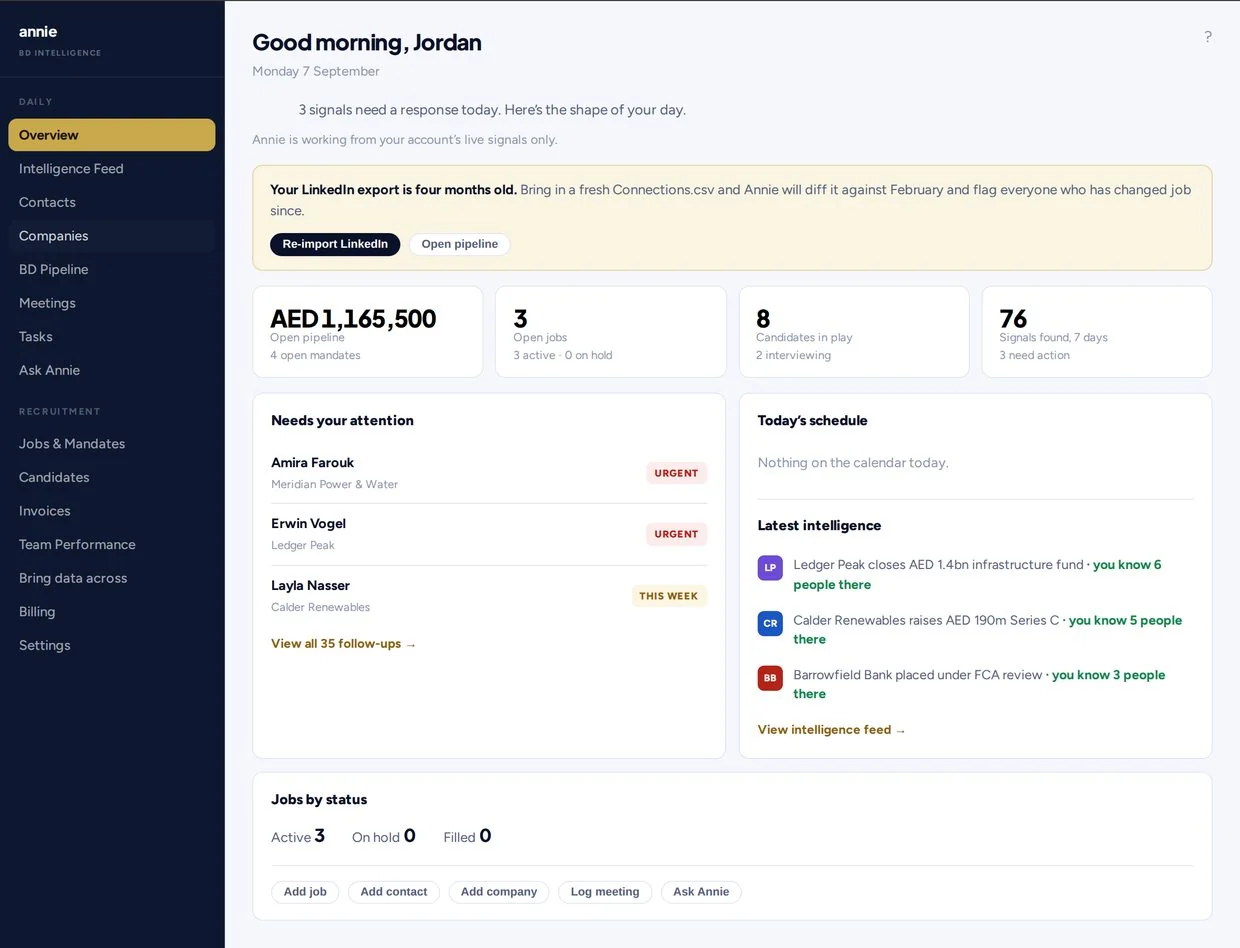
Annie holds all of them in one desk. The reason that matters more for one person than for a team is that a team can absorb the cost of keeping two systems in step. One person cannot.
Why most recruitment CRMs go stale
A CRM is only as good as the last time someone updated it. In a live search week, nobody logs every call or email. Last-contacted dates go fuzzy, and relationships that were warm a year ago drop out of sight. The board still looks tidy while the book underneath goes cold.
The failure is quiet, which is what makes it expensive. Nothing breaks. No screen shows an error. The list simply stops reflecting who you actually know, and you carry on working from the handful of names you happen to remember. The same thing happens faster in a spreadsheet, which we set out in recruitment CRM vs spreadsheets.
Annie fills in the part that usually goes stale. She takes connected-on dates from your LinkedIn export and last-emailed dates from your mailbox, and she turns email exchanges into dated notes on the contact. You do not have to type the admin.
That matters because the dates are what the ranking runs on. Seniority tells you whether someone could commission a search. How many people you know at the same company tells you whether it is a real account or a stray connection. When you connected tells you whether they will remember you. None of those three need you to have logged anything.
How Annie works as a recruitment CRM
Five steps, and the full walkthrough is on how Annie works.
- Import your LinkedIn connections. Upload Connections.csv or the full archive zip. Annie turns it into contacts, ranked by seniority and by the functions you recruit into. There is a step-by-step guide to turn your LinkedIn export into a call list.
- Connect your mailbox. Google or Microsoft. Annie reads who you emailed and when. She never sends anything by herself.
- Get a ranked call list. You see the people you already know but have not worked with or reached out to, with the reason written on every row. Warm and cold sit in plain view.
- Run the search in the same place. Contacts, companies, jobs and mandates, candidates, pipeline, meetings, tasks and invoices are all in one desk.
- Get a short morning email. On days when there is something worth a call, you get up to five names, each with how you are connected and why today makes sense. One click turns it off.
No card. No demo call.
What to look for in a recruitment CRM
Use this list whatever recruitment CRM software you are weighing up. Most of it is answerable from a pricing page in five minutes, and the items that are not are the ones worth asking about. There is a longer version in how to choose a recruitment CRM.
- You can start the day you sign up, without an onboarding project or a sales demo
- It imports the LinkedIn connections and mailbox you already have
- It shows who you have actually spoken to, not just who you are connected with
- It keeps contact dates current without manual logging
- It holds delivery (jobs, candidates, pipeline, invoices) and BD in one place
- It labels guesses and background information honestly
- The price is one number you can read without booking a call
- You can cancel without a long contract
Recruitment CRM vs ATS
An ATS (applicant tracking system) tracks candidates through a job: applied, screened, interviewed, offered, placed. A CRM tracks relationships: the clients and contacts you win work from. Agency recruiters need both, because the placement comes from the job and the next job comes from the relationship.
In practice the two words get used loosely, and plenty of products labelled one do some of the other. The question worth asking is not what it is called. It is whether the system can tell you who to approach next, or whether it can only tell you what you already did.
Annie includes both. Candidates and pipeline sit next to the clients and contacts you do business development with, so you do not have to keep a second system.
Keeping your network current
People change jobs all the time, and a contact who moved is often your best reason to call. Re-import your LinkedIn export every six months and Annie compares it with the last file. She flags everyone in your network who changed seat since then, and she reminds you on the dashboard when six months have passed.
Who Annie is for
Annie is built for recruiters who do delivery and business development themselves: independent recruiters, solo agency owners, freelance recruiters and small executive search desks. If you run a large team that needs complex permissions and manager reporting, a team-first ATS will suit you better.
Recruitment CRM pricing
Annie is one plan for one recruiter at $129 a month, or $1,290 a year. There is no setup fee, no minimum term and no seats to count. The trial is seven days and needs no card. After you pay, you can cancel from billing at any time and keep access until the end of the period. No refunds, except where required by law. See Annie pricing for the full breakdown.
Questions
A recruitment CRM is software that keeps track of a recruiter's clients, candidates, jobs and conversations in one place, so relationships and searches don't live in spreadsheets and inboxes.
An ATS tracks candidates through a job. A CRM tracks the client and contact relationships that bring in jobs. Annie includes both in one desk.
Annie is built for recruiters who work alone. It starts from your own LinkedIn export and mailbox and ranks the people you already know, and it's priced for one recruiter at $129 a month.
No. Annie ranks contacts, reminds you and drafts messages if you ask. Every message goes from your own mailbox, and only when you send it.
You can import your LinkedIn connections and connect your mailbox on the day you sign up, then work the ranked list the same day. No demo call is needed.
$129 a month or $1,290 a year for one recruiter. The trial is seven days and needs no card. No refunds, except where required by law.
Annie works for recruiters anywhere. Prices are in US dollars.