The job a recruiter's CRM should do
You know more people than you could ever call. Your LinkedIn connections run into the thousands. Your inbox holds years of threads. Somewhere in there is the client who is about to hire.
Most mornings, most of us still ring the handful of names we happen to remember. The rest sit in a list that looks tidy and tells you nothing.
A CRM for recruiters should close that gap. Storing records is the easy part. The useful part is telling you which of those people has a real reason to hear from you this week.
What it needs to hold
Whatever you use, these records need a home, and they need to live together:
- Contacts and companies. Each person with one timeline of calls, meetings, notes and stage moves, and each company with everyone you know inside it.
- Jobs and mandates. What you have been asked to fill, with a pipeline for each one.
- Candidates. Their CVs and every other document on them, not just the latest version.
- Placements and invoices. Raise the invoice and email it to your client from the same place.
- Meetings and tasks. What you agreed to do next, and by when.
- Your email. Connect Gmail or Outlook, and each email lands on the right contact.
Annie holds all of it in one desk. For the full breakdown of the category, read our recruitment CRM guide.
Why a list of names is not a call list
A LinkedIn export tells you who you are connected to and when you connected. It says nothing about who you have actually spoken to. It doesn't know who changed job last month, or whose company just raised money.
Sorted A to Z, it reads like a phone book. Sorted by seniority, it is a list of people who have never heard of you. Neither tells you where to start on a Monday.
There is a step-by-step guide to turn your LinkedIn export into a call list. Annie does the same work every day, across your whole network.
How Annie picks who you call
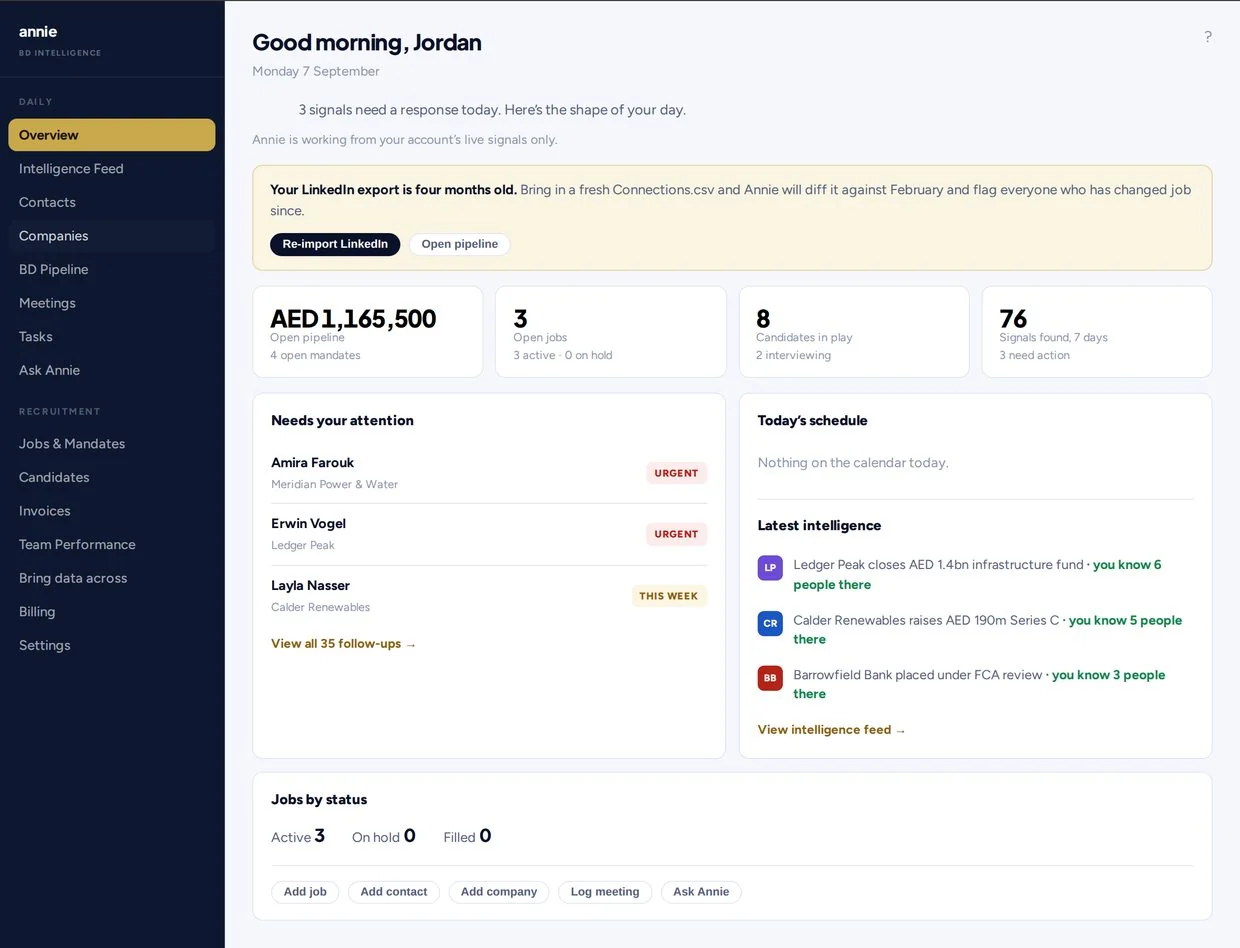
Every morning Annie reads three things: your own records, your mailbox and the news about the companies your contacts work at. The people with the strongest reason to hear from you go to the top. The reasons she looks for:
- Something moved at their company. A funding round, a new appointment at the top, an expansion, or a live role on the company's own careers page. Every signal links to its source.
- They moved. Re-import your LinkedIn connections and Annie compares them with your last file, so you see who has changed job.
- A thread went cold. Replies you never answered, and relationships that have gone quiet.
- Someone you have let slip. Past clients worth a call again, and senior people you know but have never called.
Each name comes with why now and a suggested opening. Ask, and Annie drafts the approach in your words. Nothing is sent until you press send.
When the person you know has gone quiet, Annie shows you other ways into the same company. And on mornings when something is worth a call, she sends you a short email so you don't have to open the app to find out.
Day one with Annie
There is no onboarding project and no demo call. You can be set up in about ten minutes.
- Add your LinkedIn connections. Upload the Connections.csv file or the full archive. Here's how to prepare your LinkedIn export.
- Connect Gmail or Outlook. You sign in with Google or Microsoft, and your emails start landing on the right contacts.
- Add your clients, jobs and candidates. Drop in a CV, and Annie fills in the candidate record for you to check.
- Open your call list. Annie starts watching the companies your contacts work at, and the list is ready to work the same day.
Delivery sits on the same desk
Business development and delivery feed each other. The placement comes from the job, and the next job comes from the relationship. Keep them in two systems and the join between them lives in your head.
In Annie, open a job and see which of your own candidates fit, with the reason for each. Search candidates with Boolean strings, and add your own custom fields for whatever you track. Send a client a view-only shortlist link. When the placement lands, raise the invoice and email it from Annie.
You can also ask Annie about any client, candidate or company, even one that isn't in your CRM yet. Log a call or a note just by telling her.
A checklist before you pick a CRM
Put any CRM for recruiters through these questions. Most can be answered from a pricing page in a few minutes. The rest are worth asking out loud. There is a longer version in how to choose a recruitment CRM.
- You can start the day you sign up, without a sales demo
- It works from the LinkedIn connections and mailbox you already have
- It shows who you have actually spoken to, not just who you are connected to
- It tells you why a person is worth a call, and links the source
- It holds jobs, candidates, placements and invoices next to your BD
- Nothing is sent to a client or candidate unless you send it
- The price is one number you can read without booking a call
- You can cancel without a long contract
Who Annie is for
Annie is built for recruiters who win their own work and fill it themselves: independent recruiters, agency founders, freelance recruiters and boutique firms. If you run your desk alone, the CRM for solo recruiters page covers your case in more detail. If you run retained search, see Annie for executive search.
Want to see how it thinks before you sign up? Try the free top three calls tool. Add a few people you know and get today's three calls, in order.
Pricing
Annie costs $159 a month for one recruiter. That covers the whole CRM, the daily call list, the market signals and 150 contact lookups a month. There is no setup fee and no minimum term. The trial runs for seven days and needs no card. After you pay, you keep access until the end of the period. No refunds, except where required by law. See Annie pricing for monthly and yearly options.
Questions
It's the system a recruiter uses to keep track of clients, contacts, jobs, candidates and every conversation with them. A good one also helps you decide who to contact next, not just record who you contacted last.
A list stores names. Annie reads your records, your mailbox and the news about the companies you know. Then she ranks who is worth a call today, with the reason and a suggested opening.
Keep it if it's working for you. Most tools are built around sending. Annie's job is knowing who to call. Every morning she reads your own network and your market, spots funding rounds and new appointments at companies where you know someone, picks up moves when you re-upload your LinkedIn file, and tells you who's worth a call and what to say. Run her alongside what you have, or use her as your whole CRM, with pipeline, candidates, placements and invoices included. $159 a month, 7-day free trial, no card, cancel any time.
No. Annie ranks, reminds and drafts when you ask. Every message goes from your own mailbox, and nothing leaves until you press send.
About ten minutes. Add your LinkedIn connections, connect Gmail or Outlook, and your call list is ready the same day. No demo call is needed.
$159 a month for one recruiter. The trial is seven days and needs no card. No refunds, except where required by law.